Flanders Aerial Photo Project 1914-1918
During the First World War, millions of aerial photos were taken on the Western Front in France and Belgium to provide battlefield intelligence for Allied Army Commanders. The Aerial Photo 1914-1918 project was undertaken to compile and catalogue thousands of these battlefield images from the archives and make them available for public use.
The project highlighted here is a subset of that collection, and includes over 2,000 photographs taken during the war of the Ypres Salient and surrounding area in Belgium. The Ypres Salient was where the Second Battle of Ypres and the Battle of Passchendaele were fought, conflicts that saw British, Canadian, Australian and German soldiers sacrificed in great numbers.
This project makes these aerial photographs available in a web based format so the landscapes and battlefields of this contested region of Belgium can be viewed and compared in chronological order for the years 1914 - 1918.
The Flanders Photo project was an initiative undertaken as a collaboration between the Province of West Flanders, In Flanders Fields Museum, Imperial War Museums, War Heritage Institute and the Department of Archaeology at Ghent University. The portal below is provided with permission from the Aerial Photo 1914-1918 Project.
We would like to extend our sincere gratitude to these institutions for their generosity in granting us permission to include this valuable resource on our website.
The introduction below provides instructions on how to navigate the site and display aerial photographs from the Ypres Salient and surrounding area.
While looking at these images, it is worth remembering that the battleground of the Ypres Salient took the lives of over 250,000 Allied serviceman and an estimated 200,000 German soldiers during the five years of the First World War.
How to Display Flanders Aerial Photos
When the interactive map first opens, an area of southern Belgium and northern France is displayed. The steps to view the First World War aerial photos is illustrated below:

Step 1: Using two fingers, un-pinch zoom to enlarge the map, Step 2: Keep zooming in until the scale is about 1:10,000.
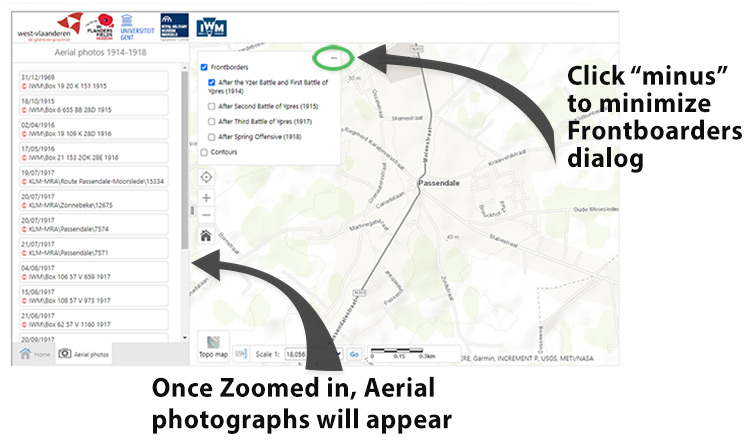
Step 3: Links to the photos will appear on the left panel, in chronological order, Step 4: Click a Frontborders checkbox to see the farthest extent the allies reached during these battles, Step 5: Click the "minus" sign to minimize this dialog box.
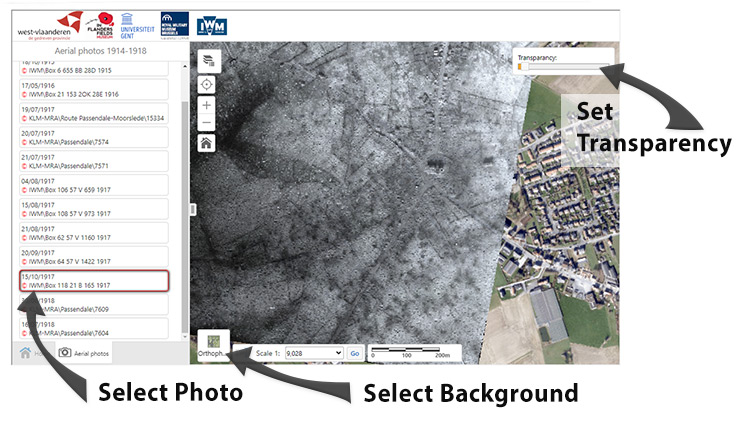
Step 6: Select the background: Topo Map (default), Orthophoto shows modern aerial view (shown in example) Step 7: Click link to an Aerial photo, Step 8: Use Transparency slider to compare photo with background.
Click here to open the Flanders Aerial Photo Project:
Flanders Aerial Photo Project